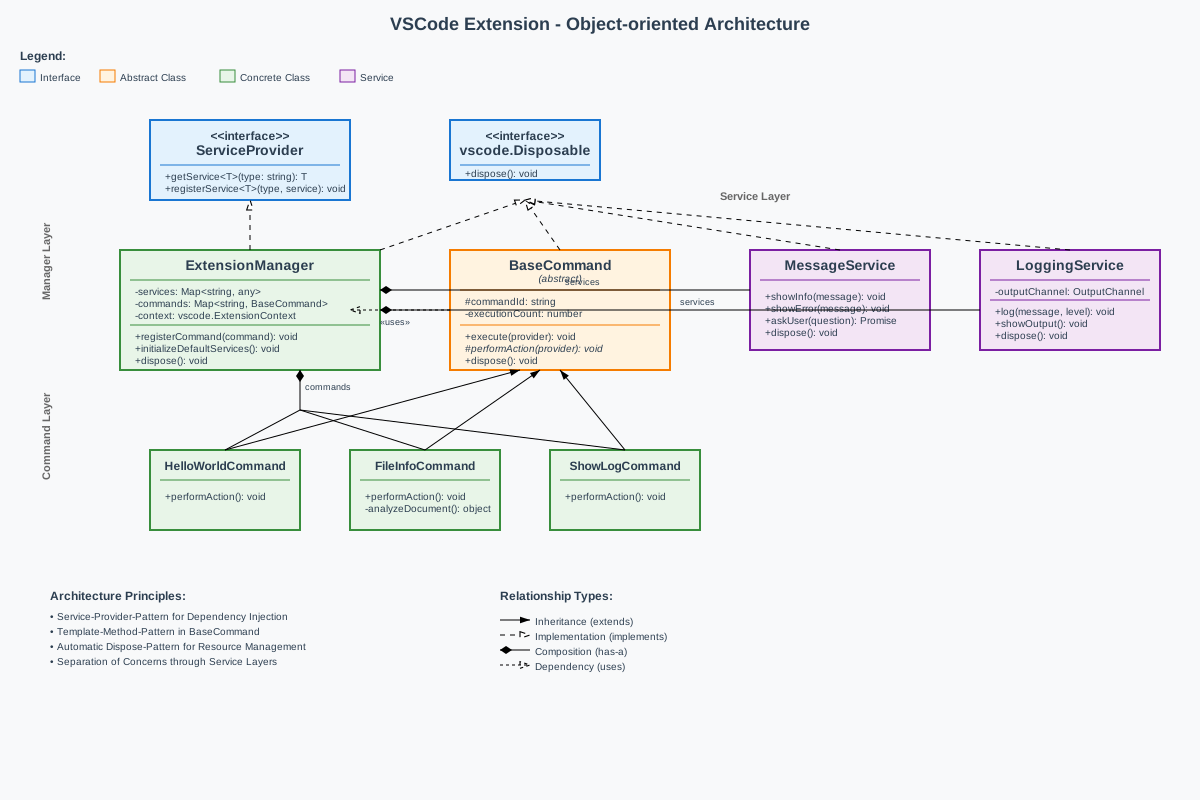
This chapter explains the use of object-oriented concepts such as inheritance, abstraction, and service architecture when building more complex VSCode extensions in TypeScript. The focus is on service-oriented architectures with a central manager, abstract command classes, and the dependency injection pattern for maintainable extension structures.
More complex extensions benefit from a three-layer architecture: a
central ExtensionManager acts as a service provider and
command registry, abstract BaseCommand classes provide
consistent execution logic, and specialized services handle
cross-cutting concerns such as logging or configuration.
This structure corresponds to the dependency injection pattern from Java enterprise applications, but uses TypeScript-specific features such as structural interfaces and automatic dispose mechanisms. Services are registered centrally and accessed by interface type, commands receive their dependencies injected via the manager.
ExtensionManager (Service Provider)
├── ServiceRegistry (Map<string, Service>)
│   ├── LoggingService
│   ├── MessageService
│   └── ConfigurationService
└── CommandRegistry (Map<string, BaseCommand>)
    ├── HelloWorldCommand
    ├── FileInfoCommand
└── ShowLogCommandThe ExtensionManager implements the service provider
pattern and acts as the central access point for dependency injection.
It manages both services and commands and ensures automatic cleanup via
the dispose pattern.
interface ServiceProvider {
    getService<T>(serviceType: string): T | undefined;
    registerService<T>(serviceType: string, service: T): void;
}

class ExtensionManager implements ServiceProvider, vscode.Disposable {
    private services = new Map<string, any>();
    private commands = new Map<string, BaseCommand>();
    private disposables: vscode.Disposable[] = [];

    constructor(private context: vscode.ExtensionContext) {
        this.initializeDefaultServices();
    }

    public getService<T>(serviceType: string): T | undefined {
        return this.services.get(serviceType);
    }

    public registerService<T>(serviceType: string, service: T): void {
        this.services.set(serviceType, service);
        if (service && typeof (service as any).dispose === 'function') {
            this.disposables.push(service as any);
        }
    }

    public registerCommand(command: BaseCommand): void {
        const commandId = command.getId();
        this.commands.set(commandId, command);

        const disposable = vscode.commands.registerCommand(commandId, () => {
            command.execute(this);
        });

        this.context.subscriptions.push(disposable);
    }
The manager acts as a central injector: commands receive the manager
as a parameter and can retrieve their dependencies via
getService(). This eliminates tight coupling between
commands and services.
The abstract BaseCommand class implements the template
method pattern and provides consistent execution logic. Subclasses only
need to implement the specific business logic in
performAction().
abstract class BaseCommand implements vscode.Disposable {
    protected readonly commandId: string;
    private executionCount: number = 0;

    constructor(commandId: string) {
        this.commandId = commandId;
    }

    public execute(serviceProvider: ServiceProvider): void {
        this.executionCount++;
        this.logExecution(serviceProvider);

        try {
            this.performAction(serviceProvider);
        } catch (error) {
            this.handleError(error, serviceProvider);
        }
    }

    protected abstract performAction(serviceProvider: ServiceProvider): void;

    public getId(): string { return this.commandId; }
    public dispose(): void { }

    private logExecution(serviceProvider: ServiceProvider): void {
        const logger = serviceProvider.getService<LoggingService>('logging');
        logger?.log(`Command ${this.commandId} executed (${this.executionCount}x)`);
    }
The template method pattern separates infrastructure code (logging, error handling) from business logic. Each command automatically receives logging and exception handling without duplicating logic.
Services implement reusable functionality and are defined via
interfaces. The MessageService and
LoggingService demonstrate typical service patterns for
extensions.
class MessageService implements vscode.Disposable {
    public showInfo(message: string): void {
        vscode.window.showInformationMessage(message);
    }

    public showError(message: string): void {
        vscode.window.showErrorMessage(message);
    }

    public async askUser(question: string, ...options: string[]): Promise<string | undefined> {
        return vscode.window.showQuickPick(options, { placeHolder: question });
    }

    public dispose(): void { }
}

class LoggingService implements vscode.Disposable {
    private outputChannel: vscode.OutputChannel;

    constructor(channelName: string) {
        this.outputChannel = vscode.window.createOutputChannel(channelName);
    }

    public log(message: string, level: 'info' | 'warn' | 'error' = 'info'): void {
        const timestamp = new Date().toISOString();
        this.outputChannel.appendLine(`[${timestamp}] ${level.toUpperCase()}: ${message}`);
    }

    public showOutput(): void {
        this.outputChannel.show();
    }

    public dispose(): void {
        this.outputChannel.dispose();
    }
}
Services encapsulate VSCode API calls and provide uniform interfaces. Commands interact with these interfaces instead of directly with the VSCode API, which improves testing and maintainability.
A concrete command implementation shows dependency injection in action:
class FileInfoCommand extends BaseCommand {
    constructor() {
        super('demo.fileInfo');
    }

    protected performAction(serviceProvider: ServiceProvider): void {
        const messageService = serviceProvider.getService<MessageService>('message');
        const logger = serviceProvider.getService<LoggingService>('logging');

        const editor = vscode.window.activeTextEditor;
        if (!editor) {
            messageService?.showError('No active editor found');
            return;
        }

        const info = this.analyzeDocument(editor.document);
        logger?.log(`File analysis completed for ${info.fileName}`);
        messageService?.showInfo(`${info.fileName}: ${info.lineCount} lines, ${info.sizeKB} KB`);
    }

    private analyzeDocument(document: vscode.TextDocument) {
        return {
            fileName: document.fileName.split('/').pop() || 'Unknown',
            lineCount: document.lineCount,
            sizeKB: Math.round(Buffer.byteLength(document.getText(), 'utf8') / 1024)
        };
    }
}The object-oriented architecture is brought together in the
activate function. The manager automatically initializes
services and commands are registered with dependency injection.
let extensionManager: ExtensionManager;

export function activate(context: vscode.ExtensionContext) {
    extensionManager = new ExtensionManager(context);

    const commands = [
        new HelloWorldCommand(),
        new FileInfoCommand(),
        new ShowLogCommand()
    ];

    commands.forEach(command => extensionManager.registerCommand(command));
    context.subscriptions.push(extensionManager);

    const logger = extensionManager.getService<LoggingService>('logging');
    logger?.log('Extension activated with OOP architecture');
}
The manager takes care of the complete registration and cleanup management. Commands do not need to deal with VSCode-specific registration but focus on their business logic.
This object-oriented architecture provides decisive advantages for larger extensions: services are reusable and testable, commands follow consistent patterns, and dependencies are explicit and interchangeable. The dispose pattern ensures automatic resource management without manual cleanup code.
For small extensions, this overhead is unnecessary, but from around 5–10 commands and several services, the structure pays off through improved maintainability and extensibility. The architecture scales well and enables later refactorings without breaking changes to the command API.