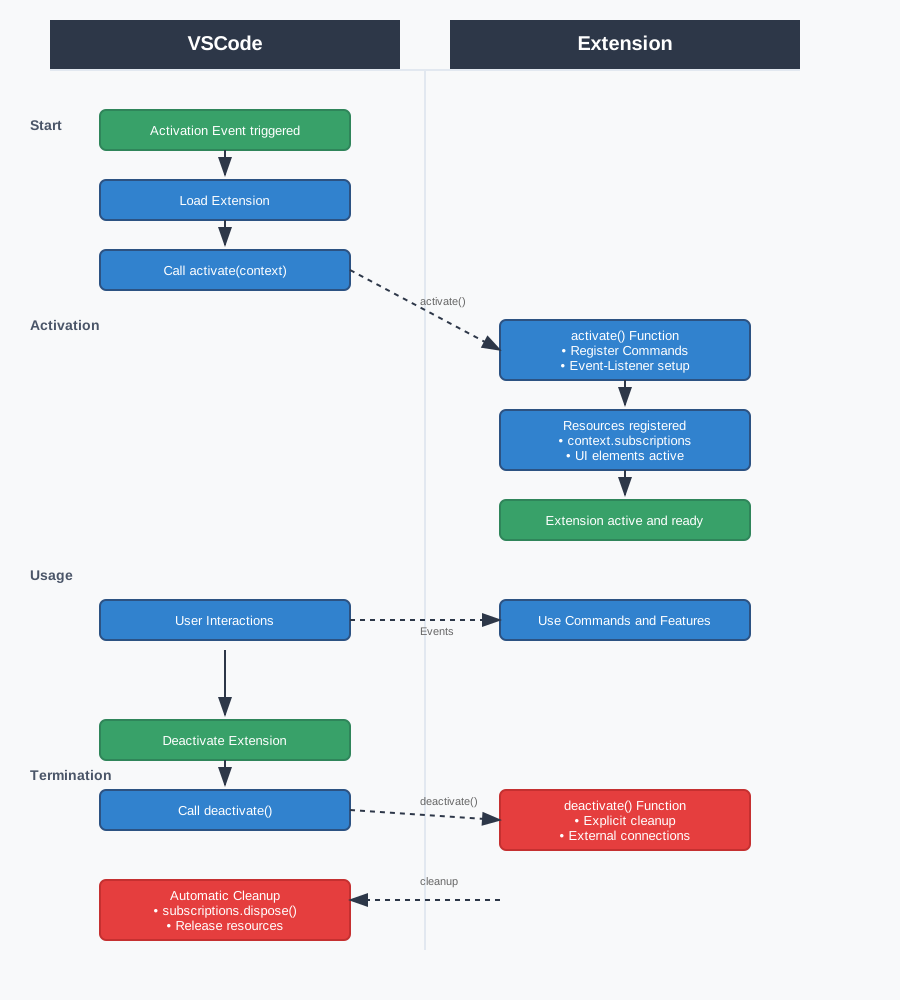
activate() and deactivate()This chapter describes the lifecycle of a VSCode extension with a
focus on initialization (activate()), controlled cleanup
(deactivate()), activation events, and error handling in
production. The lifecycle follows a lazy-loading pattern that optimizes
memory usage and startup time.
The activate() function serves as the only entry point
of an extension and is only invoked when needed. The
ExtensionContext parameter provides the central interface
to the VSCode environment and manages automatic resource cleanup via the
subscriptions array.
Each registered resource is automatically cleaned up when the
extension is deactivated. This pattern eliminates common memory leaks
and greatly simplifies resource management. The context also provides
access to persistent state storage via globalState and
workspaceState.
export function activate(context: vscode.ExtensionContext) {
    console.log('[Extension] Activation started');

    // Command registration
    const command = vscode.commands.registerCommand('extension.analyze', () => {
        const editor = vscode.window.activeTextEditor;
        if (editor) {
            vscode.window.showInformationMessage(`${editor.document.lineCount} lines`);
        }
    });

    // Event listener for document changes
    const documentListener = vscode.workspace.onDidOpenTextDocument((doc) => {
        console.log(`[Extension] Document opened: ${doc.fileName}`);
    });

    // Persistent state management
    const activationCount = context.globalState.get<number>('count', 0);
    context.globalState.update('count', activationCount + 1);

    // Automatic cleanup via subscriptions
    context.subscriptions.push(command, documentListener);
}Extensions can include asynchronous initialization logic when
configuration files need to be loaded, external services connected, or
extensive setup operations performed. The activate()
function can be implemented as an async function, and VSCode waits for
its completion.
Asynchronous activation should be used sparingly, as it increases extension startup time. Critical initialization should be synchronous, while optional features can be initialized later.
export async function activate(context: vscode.ExtensionContext): Promise<void> {
    console.log('[Extension] Asynchronous activation started');

    try {
        // Critical synchronous initialization first
        const essentialCommand = vscode.commands.registerCommand('extension.quick', () => {
            vscode.window.showInformationMessage('Immediately available');
        });

        // Load asynchronous configuration
        await loadExternalConfiguration();

        // Register extended features after async init
        const advancedCommand = vscode.commands.registerCommand('extension.advanced', async () => {
            const result = await performAdvancedOperation();
            vscode.window.showInformationMessage(`Result: ${result}`);
        });

        context.subscriptions.push(essentialCommand, advancedCommand);
        console.log('[Extension] Async activation completed');

    } catch (error) {
        console.error('[Extension] Activation failed:', error);
        vscode.window.showErrorMessage('Extension could not be fully loaded');
        throw error;
    }
}

async function loadExternalConfiguration(): Promise<void> {
    // External configuration or API connections
    return new Promise(resolve => setTimeout(resolve, 200));
}Extensions can register various UI elements and event listeners, all managed via the ExtensionContext. StatusBar items, TreeViews, WebViews, and event listeners follow the same registration pattern and are automatically cleaned up.
The subscriptions array acts as a central disposal
manager. All resources that implement the Disposable
interface can be registered here. VSCode automatically calls each
resource’s dispose() method when the extension is
deactivated.
export function activate(context: vscode.ExtensionContext) {
    // StatusBar element for extension status
    const statusItem = vscode.window.createStatusBarItem(vscode.StatusBarAlignment.Left);
    statusItem.text = "$(tools) Analyzer";
    statusItem.tooltip = "Extension is active";
    statusItem.show();

    // Workspace event for automatic analysis
    const workspaceWatcher = vscode.workspace.onDidSaveTextDocument((document) => {
        if (document.languageId === 'typescript') {
            console.log(`[Extension] TypeScript file saved: ${document.fileName}`);
            statusItem.text = "$(sync~spin) Analyzing...";
            setTimeout(() => statusItem.text = "$(check) Ready", 1000);
        }
    });

    // Configuration watcher for settings changes
    const configWatcher = vscode.workspace.onDidChangeConfiguration((event) => {
        if (event.affectsConfiguration('extension.analyzer')) {
            console.log('[Extension] Configuration changed');
        }
    });

    // Manage all resources automatically
    context.subscriptions.push(statusItem, workspaceWatcher, configWatcher);
}The deactivate() function is called when an extension is
deactivated and serves for explicit cleanup operations not covered by
the subscriptions array. It is optional and should only be
implemented when needed.
Typical use cases include closing external connections, saving non-persistent data, or cleaning up temporary files. The function can be implemented synchronously or asynchronously, depending on the complexity of the cleanup operations.
export function deactivate(): void {
    console.log('[Extension] Deactivation initiated');
    cleanupTemporaryFiles();
    saveUnsavedUserData();
}

// For complex async cleanup
export async function deactivate(): Promise<void> {
    console.log('[Extension] Async deactivation started');
    await saveRemoteData();
    await closeExternalConnections();
}Activation events determine when VSCode loads an extension and are
crucial for performance. Extensions should be activated as late as
possible to minimize memory usage and startup time. Events are defined
in package.json and should be chosen specifically.
Choosing the right activation events has a significant impact on
VSCode performance. onStartupFinished should only be used
for extensions that are truly needed at every VSCode startup. Specific
events like onCommand or onLanguage are
usually better suited.
{
  "activationEvents": [
    "onCommand:extension.analyze",        // On specific command
    "onLanguage:typescript",              // On TypeScript files
    "workspaceContains:**/*.config.js",   // On config files in workspace
    "onFileSystem:sftp"                   // On SFTP file system access
  ]
}Extensions should handle activation errors gracefully and display
meaningful error messages to the user. Try-catch blocks in the
activate() function prevent individual errors from
disabling the entire extension.
Robust error handling distinguishes between critical errors that render the extension unusable and non-critical problems that affect individual features. Performance monitoring helps identify slow activation processes.
export async function activate(context: vscode.ExtensionContext): Promise<void> {
    const startTime = Date.now();
    console.log('[Extension] Activation started');

    try {
        // Register critical core features
        registerEssentialCommands(context);

        // Optional features with separate error handling
        try {
            await initializeAdvancedFeatures(context);
        } catch (featureError) {
            console.warn('[Extension] Advanced features not available:', featureError);
            vscode.window.showWarningMessage('Some features are limited');
        }

        const duration = Date.now() - startTime;
        console.log(`[Extension] Activation completed in ${duration}ms`);

        if (duration > 1000) {
            console.warn(`[Extension] Slow activation: ${duration}ms`);
        }

    } catch (criticalError) {
        console.error('[Extension] Critical activation error:', criticalError);
        vscode.window.showErrorMessage(`Extension error: ${criticalError.message}`);
        throw criticalError;
    }
}Structured logging is essential for diagnosing lifecycle issues in production environments. Consistent log messages with timestamps and context greatly facilitate troubleshooting.
A unified logging scheme with prefixes and log levels enables effective filtering and analysis. Performance measurements during the activation phase help optimize and detect problems early.
export function activate(context: vscode.ExtensionContext): void {
    const logger = createLogger('Extension');
    const startTime = Date.now();

    logger.info('Activation started');

    try {
        logger.debug('Registering commands...');
        registerCommands(context);

        logger.debug('Initializing event listeners...');
        setupEventListeners(context);

        const duration = Date.now() - startTime;
        logger.info(`Activation completed in ${duration}ms`);

    } catch (error) {
        logger.error('Activation failed', error);
        throw error;
    }
}

function createLogger(prefix: string) {
    return {
        info: (msg: string) => console.log(`[${prefix}] ${new Date().toISOString()} INFO: ${msg}`),
        debug: (msg: string) => console.log(`[${prefix}] ${new Date().toISOString()} DEBUG: ${msg}`),
        error: (msg: string, err?: any) => console.error(`[${prefix}] ${new Date().toISOString()} ERROR: ${msg}`, err)
    };
}
A properly implemented extension lifecycle forms the foundation for stable, high-performance VSCode extensions. Through deliberate activation control, robust error handling, and systematic resource management, extensions are created that integrate seamlessly into the VSCode environment and function reliably even under heavy use.