TypeScript offers Java developers a familiar entry point into the modern JavaScript world while preserving the flexibility and performance of the JavaScript ecosystem. The combination of static typing and dynamic runtime makes it the ideal language for developing VSCode extensions.
TypeScript is not only the preferred language for VSCode extension development—it is the technically optimal choice. VSCode itself is written in TypeScript, the complete extension API is fully typed, and the tooling is seamlessly integrated.
The key advantage for Java developers lies in the combination of familiar concepts with modern flexibility. TypeScript provides interfaces, generics, and compile-time checks in an asynchronous, event-driven environment. You get the type safety of traditional languages within a modern JavaScript ecosystem.
TypeScript extends JavaScript with type annotations, interfaces, enums, and other constructs while remaining fully backward-compatible. The fundamental difference to Java lies in the processing model: while Java code is compiled to bytecode for the JVM, TypeScript is transpiled to native JavaScript.
// TypeScript code during development
interface User {
    id: number;
    name: string;
    email?: string;
}

class UserService {
    private users: User[] = [];

    public addUser(user: User): void {
        this.users.push(user);
    }

    public getUserById(id: number): User | undefined {
        return this.users.find(u => u.id === id);
    }
}
// Transpiled JavaScript for execution
"use strict";
class UserService {
constructor() {
this.users = [];
}
addUser(user) {
this.users.push(user);
}
getUserById(id) {
return this.users.find(u => u.id === id);
}
}| Phase | TypeScript Compiler (tsc) | JavaScript Engine |
|---|---|---|
| When | Build-time / Development time | Runtime / Execution |
| Input | .ts/.tsx files | .js files |
| Type Checking | Full static analysis | No type information |
| Available Constructs | Interfaces, Generics, Decorators | Only JavaScript primitives |
| Error Handling | Compile-time errors for type violations | Runtime errors for undefined/null |
| Performance Impact | Transpilation time | No additional cost |
Key Insight: TypeScript types exist only during development. At runtime, the JavaScript engine works with typeless objects and functions.
Java uses nominal typing—an object is considered to be of type X only if it explicitly implements X. TypeScript uses structural typing—an object is compatible if it has the expected structure.
// TypeScript: Structural typing
interface Drawable {
    x: number;
    y: number;
    draw(): void;
}

// No explicit implements declaration required
class Button {
    x: number = 0;
    y: number = 0;

    draw(): void {
        console.log(`Drawing button at ${this.x}, ${this.y}`);
    }

    onClick(): void {
        console.log("Button clicked");
    }
}

function renderElement(item: Drawable): void {
    item.draw(); // Button is automatically compatible
}

const button = new Button();
renderElement(button); // ✓ Works without explicit implementation
This structural typing enables flexible APIs but requires a shift in interface design thinking.
// TypeScript: All numbers are IEEE 754 double-precision
let count: number = 42;
let price: number = 3.14;
let name: string = "UserService";
let active: boolean = true;
let timestamp: bigint = 123n;

// Type inference happens automatically
let inferredNumber = 3.14;
let inferredString = "Extension";
let users = ["Alice", "Bob"];
In contrast to Java’s specific types (int,
double, float, long), TypeScript
uses only IEEE 754 double-precision numbers.
class UserRepository {
    public users: User[] = [];
    private config: Config;
    readonly maxUsers: number = 1000;
    #apiKey: string = "secret";

    constructor(config: Config) {
        this.config = config;
    }

    private validateUser(user: User): boolean {
        return user.id.length > 0;
    }
}

// After transpilation, private/readonly are not enforced!
const repo = new UserRepository(config);
repo.config = otherConfig;           // ✓ Works at runtime
repo.maxUsers = 2000;                // ✓ Works at runtime
// repo.#apiKey; // ✗ SyntaxError - true encapsulationImportant: Only private fields (ES2022)
offer true runtime encapsulation. Traditional
private/protected modifiers are compile-time
only.
// TypeScript: Full erasure
interface Repository<T extends { id: string }> {
    save(entity: T): Promise<T>;
    findById(id: string): Promise<T | null>;
}

class UserRepository implements Repository<User> {
    private users: Map<string, User> = new Map();

    async save(user: User): Promise<User> {
        this.users.set(user.id, user);
        return user;
    }

    async findById(id: string): Promise<User | null> {
        return this.users.get(id) ?? null;
    }
}
Key difference from Java: TypeScript removes all generic information completely; Java retains some metadata via type erasure and reflection.
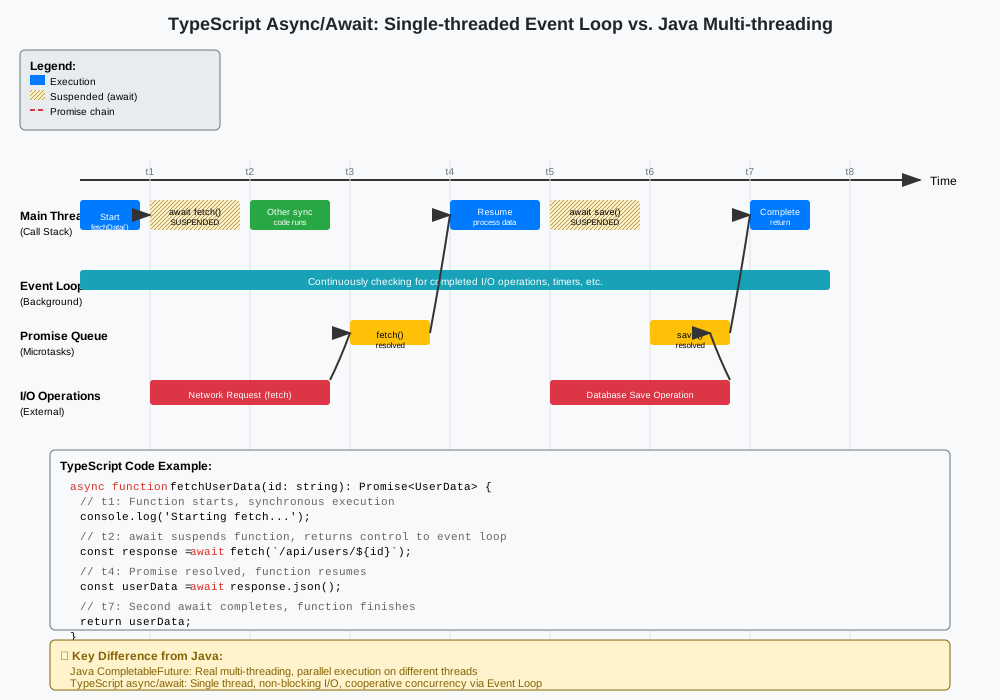
TypeScript/JavaScript uses a single-threaded event loop, not multithreading like Java.
class ApiClient {
    private baseUrl: string;

    constructor(baseUrl: string) {
        this.baseUrl = baseUrl;
    }

    async fetchUserWithDetails(id: string): Promise<UserWithDetails> {
        try {
            const user = await this.fetchUser(id);
            const profile = await this.fetchUserProfile(user.id);
            const permissions = await this.fetchUserPermissions(user.id);

            return { ...user, profile, permissions };
        } catch (error) {
            console.error('Failed to fetch user details:', error);
            throw error;
        }
    }

    async fetchMultipleUsers(ids: string[]): Promise<User[]> {
        const promises = ids.map(id => this.fetchUser(id));
        return Promise.all(promises);
    }

    private async fetchUser(id: string): Promise<User> {
        const response = await fetch(`${this.baseUrl}/users/${id}`);
        return response.json();
    }

    private async fetchUserProfile(userId: string): Promise<UserProfile> {
        const response = await fetch(`${this.baseUrl}/users/${userId}/profile`);
        return response.json();
    }

    private async fetchUserPermissions(userId: string): Promise<Permission[]> {
        const response = await fetch(`${this.baseUrl}/users/${userId}/permissions`);
        return response.json();
    }
}Important: async/await
creates no threads. All operations run on the same thread, coordinated
asynchronously via the event loop.
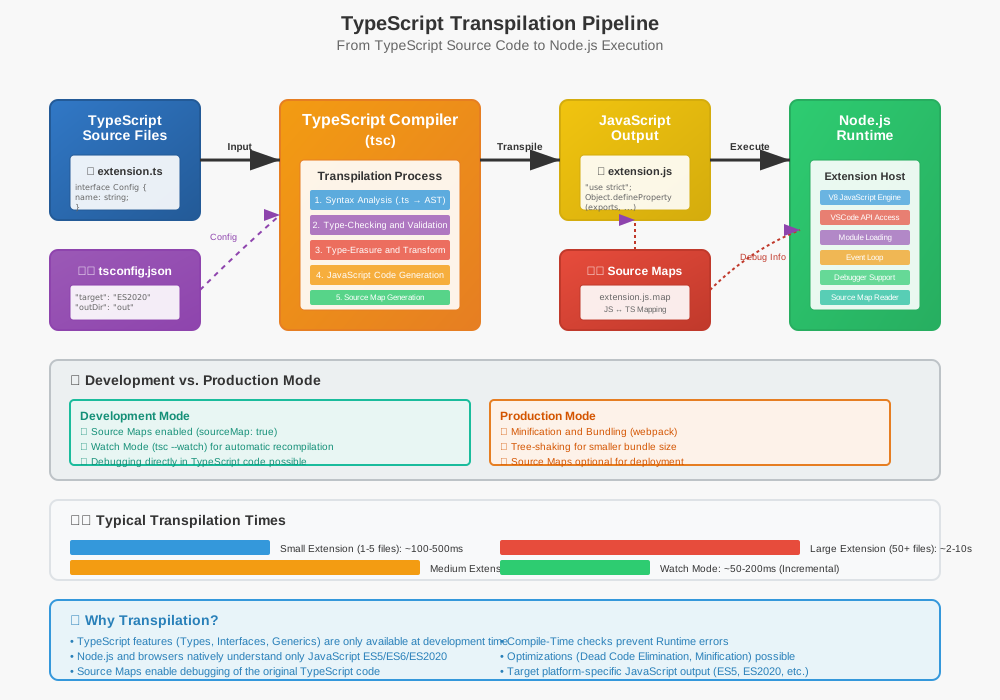
The TypeScript transpiler goes through several defined phases:
| Phase | Input | Processing | Output |
|---|---|---|---|
| Lexical Analysis | .ts source code |
Tokenization, keyword recognition | Token stream |
| Syntactic Analysis | Token stream | AST construction, syntax validation | Abstract Syntax Tree |
| Semantic Analysis | AST + type declarations | Type checking, symbol resolution | Annotated AST |
| Type Checking | Annotated AST | Interface validation, generic resolution | Validated AST |
| Code Generation | Validated AST | JavaScript emission, source map creation | .js + .js.map |
interface ApiResponse<T> {
    data: T;
    status: number;
    message?: string;
}

class DataService {
    async fetchUsers(): Promise<ApiResponse<User[]>> {
        const response = await fetch('/api/users');
        return response.json() as ApiResponse<User[]>;
    }

    private validateUser(user: User): user is ValidUser {
        return user.id > 0 && user.name.length > 0;
    }
}

enum Status {
    Loading = "loading",
    Success = "success",
    Error = "error"
}
class DataService {
async fetchUsers() {
const response = await fetch('/api/users');
return response.json();
}
validateUser(user) {
return user.id > 0 && user.name.length > 0;
}
}
var Status;
(function (Status) {
Status["Loading"] = "loading";
Status["Success"] = "success";
Status["Error"] = "error";
})(Status || (Status = {}));Eliminated Constructs:
boolean return valuesTransformed Constructs:
# syntax (ES2022+){
"compilerOptions": {
"target": "ES2020",
"module": "commonjs",
"lib": ["ES2020"],
"outDir": "out",
"rootDir": "src",
"sourceMap": true,
"strict": true,
"skipLibCheck": true,
"esModuleInterop": true
},
"exclude": ["node_modules", "out"]
}export class UserService {
public async createUser(userData: CreateUserRequest): Promise<User> {
const validatedData = this.validateInput(userData);
return await this.repository.save(validatedData);
}
}class UserService {
async createUser(userData) {
const validatedData = this.validateInput(userData);
return await this.repository.save(validatedData);
}
}
//# sourceMappingURL=user-service.js.mapSource maps allow debugging in the original TypeScript code, even though JavaScript is running.
type SearchCriteria = string | number | { field: string; value: unknown };

class DocumentSearchService {
    search(criteria: SearchCriteria): Promise<Document[]> {
        if (typeof criteria === 'string') {
            return this.searchByTitle(criteria);
        } else if (typeof criteria === 'number') {
            return this.searchById(criteria);
        } else {
            return this.searchByField(criteria.field, criteria.value);
        }
    }

    private async searchByTitle(title: string): Promise<Document[]> { return []; }
    private async searchById(id: number): Promise<Document[]> { return []; }
    private async searchByField(field: string, value: unknown): Promise<Document[]> { return []; }
}

const service = new DocumentSearchService();
const byTitle = service.search("TypeScript Guide");
const byId = service.search(12345);
const byField = service.search({ field: "author", value: "Alice" });type ApiResult<T> =
| { kind: 'loading' }
| { kind: 'success'; data: T }
| { kind: 'error'; message: string };
function handleApiResult<T>(result: ApiResult<T>): void {
switch (result.kind) {
case 'loading':
console.log("Loading...");
break;
case 'success':
console.log(result.data);
break;
case 'error':
console.error(result.message);
break;
}
}const count = 42;
const message = "Hello";
const files = ['main.ts', 'util.ts'];
const lengths = files.map(file => file.length);
const tsFiles = files.filter(file => file.endsWith('.ts'));
const firstFile = files.find(file => file.startsWith('main'));interface User {
id: string;
name: string;
email?: string;
avatar: string | null;
}
class UserService {
private users: Map<string, User> = new Map();
getUserById(id: string): User | undefined {
return this.users.get(id);
}
processUser(userId: string): string {
const user = this.getUserById(userId);
if (!user) {
return "User not found";
}
const email = user.email ?? "no-email@example.com";
const avatarUrl = user.avatar?.toString() ?? "/default-avatar.png";
return `User: ${user.name}, Email: ${email}, Avatar: ${avatarUrl}`;
}
getExistingUser(id: string): User {
return this.users.get(id)!;
}
}interface ExtensionConfig {
readonly enableFeatureA: boolean;
readonly maxRetries: number;
readonly excludePatterns: string[];
readonly logLevel: 'debug' | 'info' | 'warn' | 'error';
}
async function executeWithRetry<T>(
operation: () => Promise<T>,
maxRetries: number = 3
): Promise<T> {
for (let attempt = 1; attempt <= maxRetries; attempt++) {
try {
return await operation();
} catch (error) {
if (attempt === maxRetries) throw error;
await new Promise(resolve => setTimeout(resolve, 1000 * attempt));
}
}
throw new Error('Maximum retries exceeded');
}
const fileContent: string = await executeWithRetry(
() => vscode.workspace.fs.readFile(someUri).then(data => data.toString())
);
const editor: vscode.TextEditor | undefined = vscode.window.activeTextEditor;

if (editor) {
    const document: vscode.TextDocument = editor.document;
    const selection: vscode.Selection = editor.selection;

    const selectedText: string = document.getText(selection);
    const lineCount: number = document.lineCount;
    const languageId: string = document.languageId;

    const newSelection = new vscode.Selection(
        new vscode.Position(0, 0),
        new vscode.Position(lineCount - 1, 0)
    );
}

vscode.workspace.onDidSaveTextDocument((document: vscode.TextDocument) => {
    console.log(`Saved: ${document.fileName}`);
    console.log(`Language: ${document.languageId}`);
    console.log(`Lines: ${document.lineCount}`);
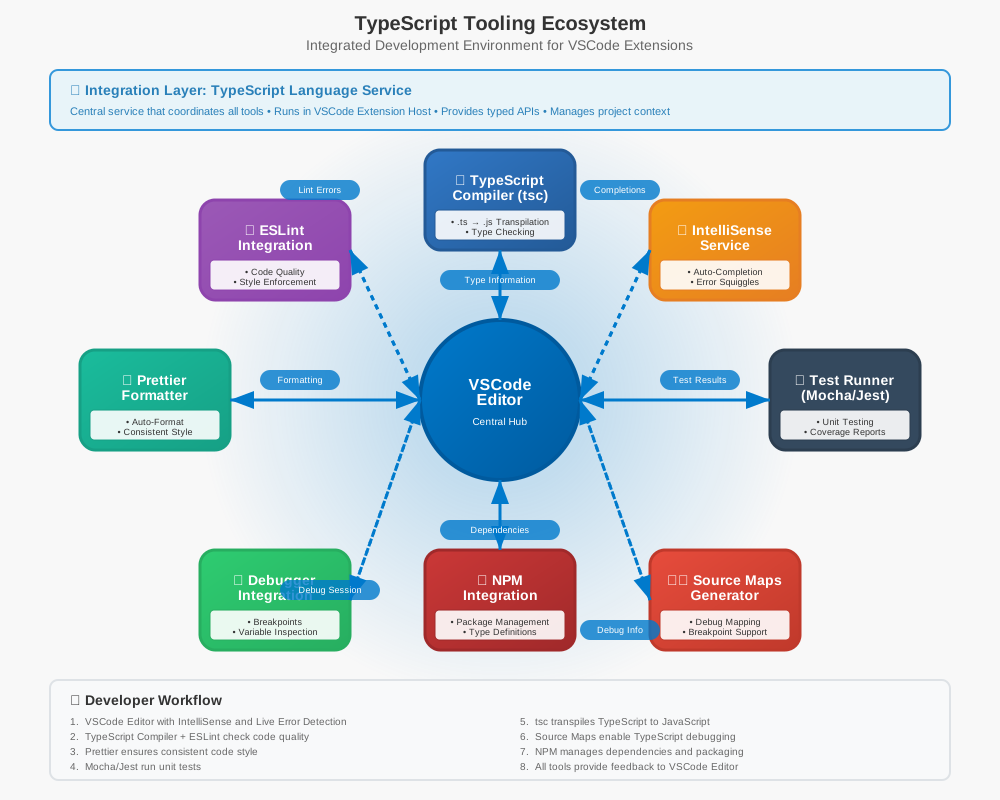
});| Feature | Purpose | Source |
|---|---|---|
| IntelliSense | Contextual code completion | TypeScript Language Service |
| Parameter Hints | Real-time function parameter info | @types/vscode definitions |
| Quick Info | Hover tooltips with documentation | JSDoc comments in API |
| Error Squiggles | Pre-save error highlighting | TypeScript compiler |
| Go to Definition | Navigation to function definitions | Source maps + type definitions |
{
    "main": "./out/extension.js",
    "scripts": {
        "vscode:prepublish": "npm run compile",
        "compile": "tsc -p ./",
        "watch": "tsc -watch -p ./"
    },
    "devDependencies": {
        "@types/vscode": "^1.60.0",
        "@types/node": "^16.x",
        "typescript": "^4.4.4"
    }
}
{
"version": "2.0.0",
"tasks": [
{
"type": "typescript",
"tsconfig": "tsconfig.json",
"problemMatcher": ["$tsc"],
"group": {
"kind": "build",
"isDefault": true
},
"presentation": {
"panel": "shared",
"reveal": "silent",
"clear": false
}
}
]
}import * as vscode from 'vscode';
export function activate(context: vscode.ExtensionContext): void {
const disposable: vscode.Disposable = vscode.commands.registerCommand(
'extension.helloWorld',
(): void => {
vscode.window.showInformationMessage('Hello from TypeScript!');
}
);
context.subscriptions.push(disposable);
}
export function deactivate(): void {
// Cleanup code here
}async function safeFileOperation(uri: vscode.Uri): Promise<string> {
try {
const content = await vscode.workspace.fs.readFile(uri);
return content.toString();
} catch (error: unknown) {
if (error instanceof Error) {
vscode.window.showErrorMessage(`File error: ${error.message}`);
throw error;
} else if (typeof error === 'string') {
vscode.window.showErrorMessage(`String error: ${error}`);
throw new Error(error);
} else {
vscode.window.showErrorMessage('Unknown error occurred');
throw new Error('Unknown error');
}
}
}interface ExtensionConfig {
readonly enableFeatureA: boolean;
readonly maxRetries: number;
readonly excludePatterns: string[];
readonly logLevel: 'debug' | 'info' | 'warn' | 'error';
}
function getConfiguration(): ExtensionConfig {
const config = vscode.workspace.getConfiguration('myExtension');
return {
enableFeatureA: config.get<boolean>('enableFeatureA', true),
maxRetries: config.get<number>('maxRetries', 3),
excludePatterns: config.get<string[]>('excludePatterns', []),
logLevel: config.get<'debug' | 'info' | 'warn' | 'error'>('logLevel', 'info')
};
}private/readonly are enforced only during
development